Why Your Neck Hurts After Work (And How to Fix It)

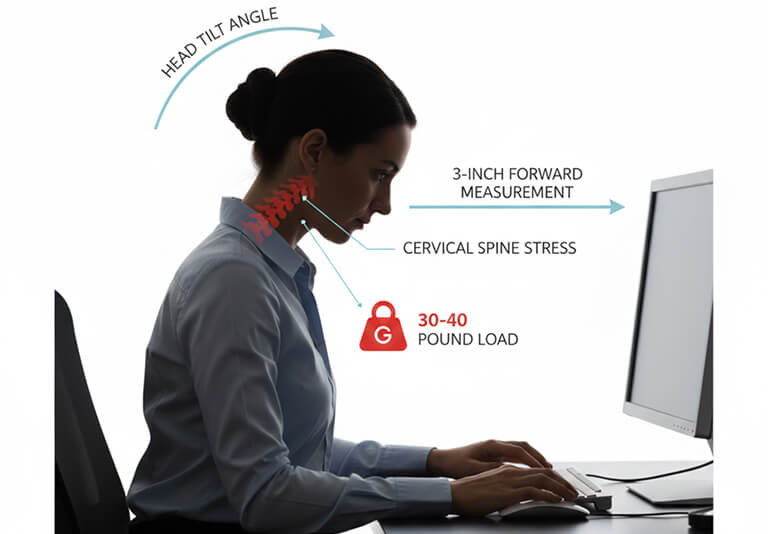
When upright and in line with your shoulders, your head weighs 10 to 12 pounds. However, when you lean forward to see your screen or type, that weight multiplies.

For every inch your head moves forward, you add approximately 10 pounds of stress to your neck. A typical 3-inch forward head position means your neck is supporting 30-40 pounds of weight. That's like holding a bowling ball at arm's length for eight hours straight.

Office Neck Pain
Good Sitting Posture

The Real Cause of Office Neck Pain

When upright and in line with your shoulders, your head weighs 10 to 12 pounds. However, when you lean forward to see your screen or type, that weight multiplies.

For every inch your head moves forward, you add approximately 10 pounds of stress to your neck. A typical 3-inch forward head position means your neck is supporting 30-40 pounds of weight.

That's like holding a bowling ball at arm's length for eight hours straight.

What Happens to Your Neck

This excessive load creates a cascade of problems:

Muscle strain: The muscles at the back of your neck are strained working overtime, holding your head up against gravity, and maintaining constant tension throughout your workday.

Joint compression: Your cervical vertebrae (the pillars of your neck) compress under increased load, irritating joints and nerves.

Protective spasm: Fatigued muscles respond with spasm, a protective mechanism that becomes its own source of pain.

Referred pain: Compressed nerves can trigger headaches, shoulder pain, arm numbness, and hand tingling.

Why Your Workstation Setup Matters

Research published in Nature (2024) found clear links between office ergonomics and neck pain. Factors like chair height and inadequate lumbar support significantly increased the risk of neck pain. Coupled with job stress, the risk increases by 1.6 times.

The good news? These are completely fixable.

The Three-Part Solution

Research indicates partial solutions don't work. You need to check the following boxes:


1. Fix Your Workstation Setup

Monitor positioning: Place your screen so the top sits slightly below eye level, and you maintain a distance of 20-28 inches between your eyes and the screen. When monitors are too low, you tilt your head down. Too high, you crane your neck up.

Desk height: Your elbows should rest at 90 degrees to the desk, with shoulders relaxed and forearms parallel to the floor.

Keyboard placement: Keep your keyboard close to avoid reaching forward, which pulls your shoulders and head with it.

2. Get Proper Seating Support

An effective ergonomic chair needs:

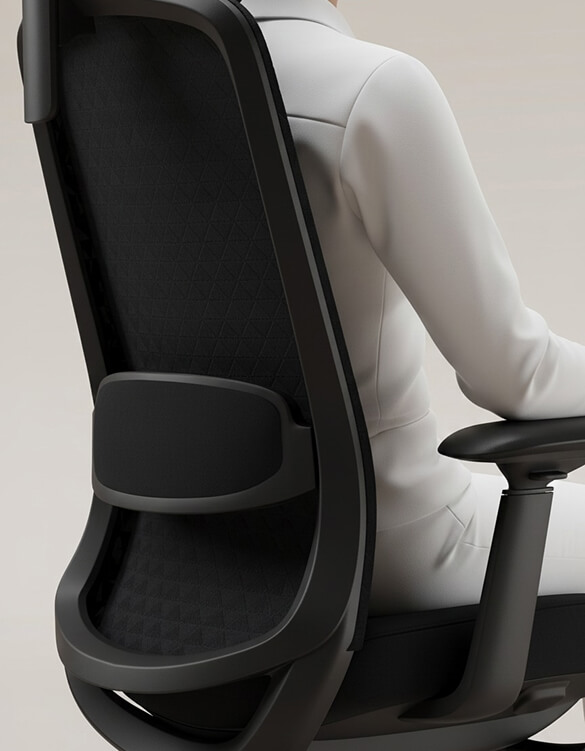
  • Adjustable lumbar support positioned at your lower back's natural curve. This is the foundation of proper spinal alignment.
  • Adjustable seat height so your feet rest flat with thighs parallel to the ground
  • Backrest adjustment to support your mid and upper back.
  • Adjustable armrests that support forearms without raising shoulders
  • A 23-month study tracking 200 workers found ergonomic chairs reduced pain significantly.


3. Build in Movement


There's no single "perfect posture." Staying in any position too long causes muscle fatigue, even with correct alignment.

The 20-20-20 rule: Every 20 minutes, take 20 seconds to look at something 20 feet away.

Postural variation: Change your sitting position regularly. Recline slightly, then sit upright. These small variations prevent muscle overload.

Micro-movements: Shoulder rolls, gentle neck stretches, and brief standing breaks help muscles reset.


What You Can Do Right Now

Check your current setup:

    • Adjustable lumbar support positioned at your lower back's natural curve. This is the foundation of proper spinal alignment.
    • Adjustable seat height so your feet rest flat with thighs parallel to the ground
    • Backrest adjustment to support your mid and upper back.
    • Adjustable armrests that support forearms without raising shoulders
    • A 23-month study tracking 200 workers found ergonomic chairs reduced pain significantly.


    3. Build in Movement


    There's no single "perfect posture." Staying in any position too long causes muscle fatigue, even with correct alignment.

    The 20-20-20 rule: Every 20 minutes, take 20 seconds to look at something 20 feet away.

    Postural variation: Change your sitting position regularly. Recline slightly, then sit upright. These small variations prevent muscle overload.

    Micro-movements: Shoulder rolls, gentle neck stretches, and brief standing breaks help muscles reset.


    What You Can Do Right Now

    Check your current setup:

    • Raise your monitor using a stand or books.
    • Lower your chair height if your feet dangle.
    • Move your keyboard closer.
    • Adjust lumbar support to match your lower back.

    Make simple adjustments:

    • Raise your monitor using a stand or books.
    • Lower your chair height if your feet dangle.
    • Move your keyboard closer.
    • Adjust lumbar support to match your lower back.

    Set movement reminders using your phone every 20-30 minutes.

    Why Most Solutions Fail

    Research reveals that equipment alone doesn't work. Training alone doesn't work either.

    A comprehensive study found that organizations providing ergonomic chairs without training saw minimal improvement. Training without equipment showed no significant benefit.

    The combination produced sustained pain reduction over 12+ months.


    What Actually Works


    A 2024 study showed how ergonomic interventions reduced the chances of neck pain development by 81% over six months.

    The key finding indicates that prevention works better than treatment. Addressing ergonomics before chronic pain develops is far more effective than treating established pain.

    Benefits typically appear within 2-3 weeks, with full realization by month three. Some studies show continued improvement through 12 months.


    When to Seek Professional Help


    See a healthcare provider if you experience:

    Pain radiating down your arm or into your hand

    Numbness or tingling in fingers

    Pain worsening despite ergonomic improvements

    Pain with headaches, dizziness, or vision changes

    Pain interfering with sleep or daily activities


    The Bottom Line

    Your neck pain isn't inevitable. The solution is evidence-based and works when implemented properly.

    Multiple peer-reviewed studies confirm that proper ergonomics significantly reduces neck pain. Take action before chronic pain becomes your norm.

    Start small. Assess your workstation. Make basic adjustments. Notice what improves.

    Your neck will thank you.

    Ergonomic Chair

    Need Help? Professional ergonomic assessments can identify specific risk factors in your workspace and provide personalized recommendations based on your body mechanics and work requirements.